Looking for the best personal safety app in the UK?
Whether you’re walking home after dark, travelling alone, working as a lone worker, or sending your child to university, a good personal safety app can provide reassurance and help you get assistance quickly when it matters most.
In this guide, we compare some of the leading personal safety apps available in the UK in 2026, explain what features really matter, and help you choose the right solution for your needs.
Why Personal Safety Apps Matter More Than Ever
Personal safety has become an increasing concern for many people across the UK. Students, healthcare workers, delivery drivers, social workers, lone workers, shift workers and people travelling alone all face situations where quick access to help can make a significant difference.
Modern safety apps can do far more than simply call emergency services. Many now include:
- One-touch SOS activation
- Live GPS location sharing
- Safety timers
- Trusted emergency contacts
- Audio and video recording
- Wearable activation buttons
- Fall detection
- Journey monitoring
- Professional monitoring services
The best app depends on your lifestyle and the situations you face.
What to Look for in a Personal Safety App
Before downloading any safety app, consider whether it offers:
Instant SOS Activation
In an emergency, speed matters. Look for an app that allows you to request help in one or two taps—or even through a wearable button.
Live Location Sharing
Your trusted contacts should be able to see where you are if you trigger an alert.
Safety Timer
A “Check on Me” or safety timer automatically alerts someone if you fail to confirm that you’re safe.
Audio and Video Recording
Evidence can be invaluable after an incident.
Wearable Support
A discreet wearable button allows you to request help without needing to unlock your phone.
Fall Detection
Automatic detection is particularly valuable for lone workers and vulnerable users.
Privacy
Your personal information should remain secure, with transparent data handling and encryption where appropriate.
Best Personal Safety Apps in the UK (2026)
Best for: Everyday personal safety, students, lone workers, families and wearable emergency assistance.
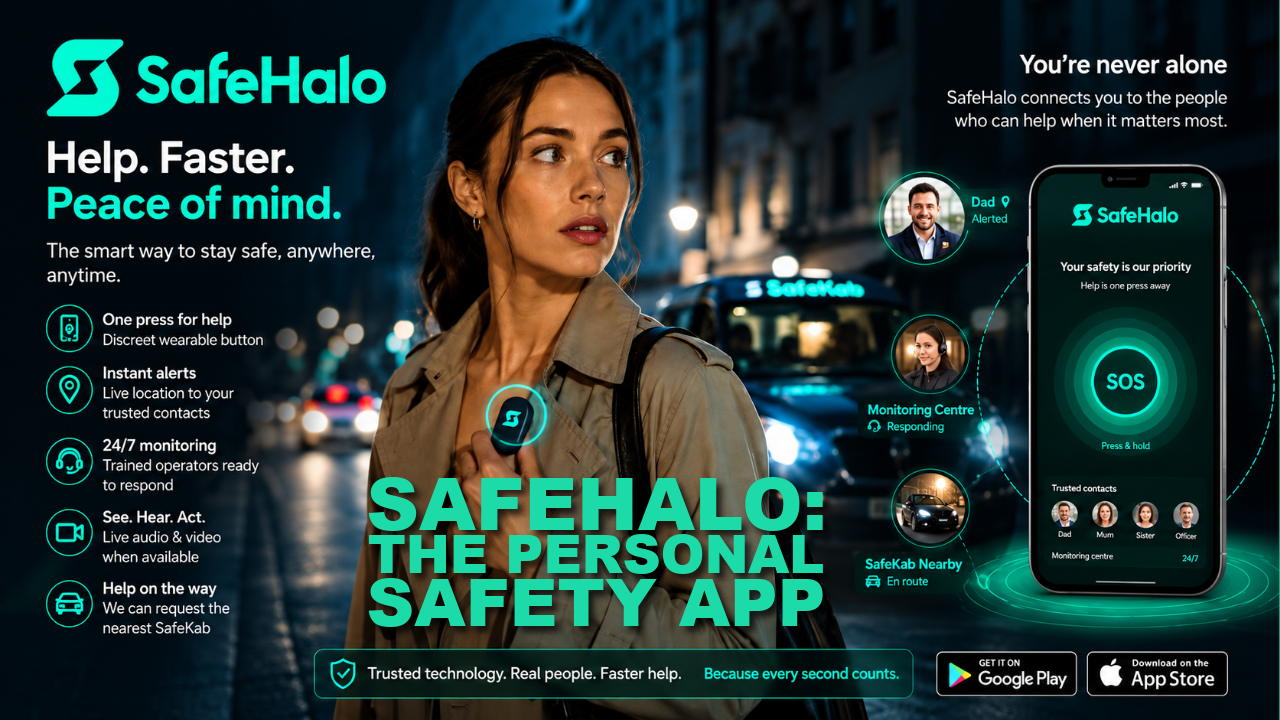
SafeHalo combines personal safety technology with optional human support. Users can activate an emergency alert using the mobile app or a discreet Bluetooth wearable worn on the wrist or attached to keys.
Key features include:
- One-touch emergency activation
- Bluetooth wearable panic button
- Live GPS location sharing
- Audio and video communication
- “Check on Me” safety timer
- SafeWalk journey monitoring
- Sudden fall detection
- Trusted contacts
- Optional 24/7 monitoring service
- Incident recording
Unlike many traditional panic apps that simply send a notification, SafeHalo can also connect premium users to trained operators who can assess the situation and coordinate assistance where appropriate. It is designed for everyday situations—from walking home after work to lone working or travelling alone.
Pros
- Wearable activation
- Optional human monitoring
- Fall detection
- Safety timer
- Live communication
Ideal for
- Students
- Lone workers
- Parents
- Shift workers
- Anyone wanting additional reassurance
- Hollie Guard
Originally developed in memory of Hollie Gazzard, Hollie Guard has become one of the UK’s most recognised personal safety apps.
Features include:
- Journey tracking
- Shake-to-activate alert
- Audio recording
- GPS tracking
- Trusted contacts
It is particularly popular among students and young professionals.
- WalkSafe+
WalkSafe focuses on helping users travel more safely by combining journey sharing with information about Safe Spaces around the UK.
Features include:
- Safe route planning
- Safe Space locations
- Journey sharing
- Trusted contacts
It is especially useful for commuters and people travelling at night.
- bSafe
bSafe is one of the longest-established international personal safety apps.
Features include:
- SOS alerts
- Live streaming
- GPS tracking
- Voice activation
- Guardian network
It works well for users who already have trusted friends and family willing to act as responders.
- Life360
Although primarily designed for families, Life360 offers:
- Family location sharing
- Driving reports
- Arrival notifications
- Crash detection (selected plans)
It is best suited to keeping family members connected rather than emergency response.
Which Personal Safety App Is Right for You?
Students
Look for:
- Journey monitoring
- Wearable activation
- Trusted contacts
- Safety timer
Lone Workers
Essential features include:
- Fall detection
- Check-in timers
- Live location
- Emergency escalation
Parents
Choose an app that offers:
- Easy activation
- Location sharing
- Trusted contacts
- Simple user interface
Shift Workers
Useful features include:
- SafeWalk
- GPS sharing
- Wearable panic button
- Audio recording
Free vs Premium Personal Safety Apps
Many apps provide useful free features such as GPS sharing or emergency contacts. Premium subscriptions typically unlock:
- Professional monitoring
- Additional emergency contacts
- Wearable integration
- Extended recording
- Fall detection
- Advanced safety features
The best choice depends on your level of risk and how often you travel or work alone.
Frequently Asked Questions
Are personal safety apps free?
Many offer a free version with optional premium upgrades.
Do safety apps automatically call 999?
Most do not automatically call emergency services. Instead, they notify trusted contacts or monitoring services depending on the app.
Can a wearable panic button work without unlocking my phone?
Many modern systems, including SafeHalo, allow activation through a paired Bluetooth wearable, making it easier to request help discreetly.
Are these apps useful for elderly relatives?
Yes. Features such as fall detection, safety timers and emergency contacts can provide additional reassurance.
Final Thoughts
No personal safety app can eliminate risk entirely, but the right one can help you react more quickly, notify the right people, and provide reassurance for both you and your loved ones.
When choosing an app, think about your daily routine. If you regularly walk home after dark, work alone, travel independently or simply want additional peace of mind, features such as wearable activation, live location sharing, safety timers and fall detection can make a real difference.
The best personal safety app is ultimately the one that you will remember to use—and that provides the level of support that matches your lifestyle.